Exploring 3D printing with kids blends creativity and practical STEM learning. This guide highlights beginner-friendly options, from kid-safe 3D pens to easy-to-use home printers, designed to keep young makers engaged while prioritizing safety and simplicity. Each pick emphasizes hands-on exploration, minimal setup, and age-appropriate materials to support learning at home or in classrooms.
| Product | Brand | Type | Why It Stands Out |
|---|---|---|---|
| 3Doodler Start+ Essentials 3D Pen Set | 3Doodler | Kid-friendly 3D printing pen | No hot parts; safety-first design for ages 6+ |
| SCRIB3D P1 3D Printing Pen | SCRIB3D | Desktop 3D printing pen kit | Beginner-friendly with ready-to-use colors and stencil guide |
| SUNLU 3D Printer For Kids | SUNLU | Mini 3D printer | Easy setup, safety features, app control |
| AOSEED | Beginner 3D printer with app control | Large design library and one-click printing | |
| MYNT3D Super 3D Pen | MYNT3D | 3D printing pen | Fine control with stepless speed and durable nozzle |
3Doodler Start+ Essentials 3D Pen Set
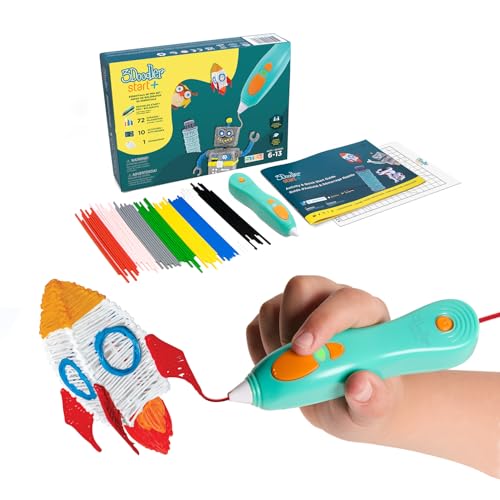
The 3Doodler Start+ is designed for children aged 6 and up, featuring a child-safe design with no hot parts to prevent burns. The pen uses kid-friendly filament and includes upgraded plastics and stencils for expanded creative options. This model emphasizes a screen-free learning experience, helping kids build real-world connections to STEM concepts quickly and safely. The Start+ offers faster charging, more filament, additional stencils, and a safety standby mode to support long, engaging sessions without supervision concerns.
SCRIB3D P1 3D Printing Pen

The SCRIB3D P1 P1 3D printing pen supports creative projects with a stepless speed control for precision. It comes as a ready-to-use kit with three starter colors of PLA, a stencil guide, and a project manual. Suitable for beginners, the P1 helps students develop spatial thinking, planning, and fine motor skills as they learn to design and realize three-dimensional objects. It is a versatile tool for classroom activities or family STEM projects, offering straightforward operation and clear learning outcomes.
SUNLU 3D Printer For Kids
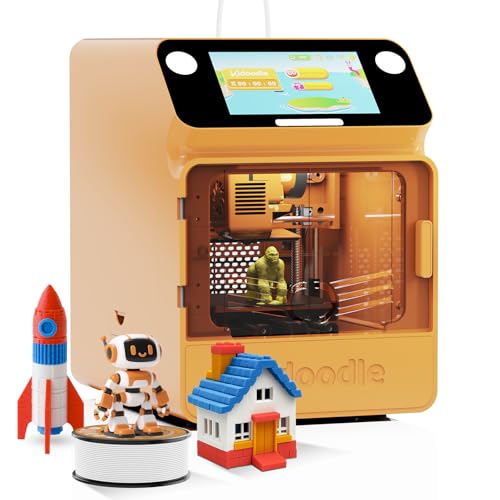
This kid-friendly mini 3D printer emphasizes safety with a fully enclosed structure and automatic standby features when doors are opened. It offers Wi-Fi control and a growing model library accessible via an intuitive app, enabling remote monitoring and printing. Its one-click printing capability makes it ideal for younger students or beginners exploring STEM topics at home or in the classroom, while the enclosed design reduces risk and increases confidence during operation.
AOSEED 3D Printer For Kids

Aseed’s AOSEED 3D Printer delivers a beginner-friendly experience with Wi-Fi and app control, a large design library, and 15+ design modules. It emphasizes ease of use for kids and families, featuring a one-click process that reduces setup friction. The model focuses on safety, reliable performance, and ongoing design updates to keep young makers engaged with fresh projects and skills progression.
MYNT3D Super 3D Pen

The MYNT3D Super 3D Pen prioritizes control, featuring a stepless speed slider to adjust material flow for precise drawing. Its ultrasonic-sealed nozzle offers improved durability and reduces clog risk, making it a dependable option for budding artists exploring 3D drawing. The pen supports a range of materials and can help children translate their 2D sketches into tangible sculptures, ideal for art-inspired STEM activities and creative investigations alike.
Buying Guide
Key purchase considerations help families choose the right 3D printing option for kids:
- Age and safety: Prioritize products with enclosed designs, low-temperature operation, and non-contact parts for younger children. Safety features reduce burn risks and supervise younger makers.
- Ease of use: Look for intuitive interfaces, quick-start guides, and clear instructions. Pens with color sets, stencils, or templates can accelerate early creativity.
- Learning goals: Decide whether the focus is on art, engineering, or general exploration. 3D pens emphasize drawing and design, while kid-friendly printers enable full model printing and iterative experimentation.
- Materials: PLA filaments are common, easy to handle, and generally safer for kids. Check compatibility and availability of kid-friendly filaments and accessories.
- Safety and supervision: Consider automatic shutoffs, heat management, and enclosure features to minimize risk during unsupervised play or classroom use.
- Space and setup: Compact, ready-to-use units suit small rooms and classrooms. Desktop printers typically require a stable surface and good ventilation.
- Connectivity and software: Apps or slicer software that are easy to navigate help kids access models and monitor projects remotely. Look for compatibility with common design tools.
- Future learning path: Some devices offer expanding libraries, ongoing updates, and community templates, which support long-term engagement and progressively challenging projects.
Across these options, parents and educators should align product choice with the child’s interests, safety considerations, and the learning outcomes sought, ensuring a constructive and enjoyable introduction to 3D printing technology.