The right toy laptop blends pretend play with early learning, building familiarity with letters, numbers, and basic tech concepts. This guide highlights five popular options that balance interactivity, durability, and educational content for preschool to early elementary ages. Each product section links to Amazon for quick reference, with key features summarized to help caregivers compare at a glance.
| Product | Brand | Key Features |
|---|---|---|
| LeapFrog 2-in-1 LeapTop Touch, Green | LeapFrog | 2-in-1 design; keyboard letters A-Z; numbers 1-10; transforms into touch tablet |
| Disney Princess Style Collection Laptop | Disney Princess | 5 play modes; over 15 phrases; double-sided screens; customizable with stickers |
| LeapFrog 2-in-1 LeapTop Touch, Pink | LeapFrog | 2-in-1 design; letters A-Z; numbers 1-10; five learning modes |
| VTech Genio Bilingual JuniorBook | VTech | QWERTY keyboard; 80+ activities; bilingual English/Spanish |
| VTech Play Smart Preschool Laptop | VTech | 30 activities; personalized name/avatar; introduces basics and languages |
LeapFrog 2-in-1 LeapTop Touch, Green

The LeapFrog LeapTop Touch combines pretend laptop play with early literacy and numeracy. A flip screen converts between a traditional keyboard and a tablet-style interface, encouraging flexibility in play. The keyboard covers A-Z and includes number keys 1-10, supporting letter recognition and basic counting. This model emphasizes role-play activities, such as emailing Scout, letting children imitate everyday digital interactions. Parents can customize the experience to help children spell their own names, reinforcing personal literacy goals while keeping playtime engaging.
Disney Princess Style Collection Laptop

This toy laptop merges imaginative play with sound effects, music, and phrases. With five play modes and more than 15 phrases, it offers a variety of interactive prompts that encourage problem-solving and memory. The two double-sided desktop screens align with the five modes of play, helping kids navigate different activities without losing focus. Customizable, the included stickers let children tailor the device to their favorite Disney princess character, boosting motivation and personal connection to learning tasks.
LeapFrog 2-in-1 LeapTop Touch, Pink
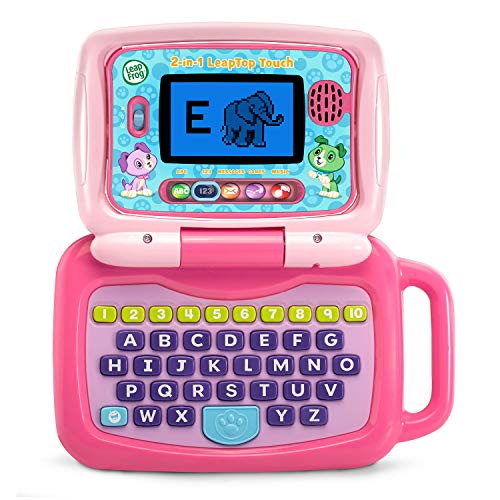
The pink variant mirrors the green LeapTop, offering the same 2-in-1 design that toggles between a keyboard and a touch tablet. The keyboard features letters A-Z and numbers 1-10, while five learning modes cover ABCs, numbers, games, music, and messages. This layout supports early literacy and numeracy in a playful, kid-friendly frame. The device is designed to withstand rough play and encourages independent exploration alongside shared activities with caregivers.
VTech Genio Bilingual JuniorBook

Designed to resemble a grown-up device, the Genio JuniorBook introduces kids to computer-like interactions with a full-size keyboard and cursor controller. It offers more than 80 activities spanning math, science, language arts, music, and even Spanish, making it a versatile learning tool. The standout feature is its fully bilingual capability, enabling English and Spanish playback across activities. This makes it suitable for early bilingual learners and caregivers seeking language immersion alongside core skills.
VTech Play Smart Preschool Laptop

VTech’s Play Smart Preschool Laptop presents a sleek, child-friendly device with 30 activities and leveled learning. Personalization options include naming the child and choosing an avatar, which helps sustain engagement. The content introduces basic language elements in multiple formats, including letter recognition, sounds, shapes, numbers, and early math concepts. It also features activities that touch on Spanish vocabulary, supporting early bilingual exposure within a familiar, professional-looking gadget design.
Buying Guide: Key Purchase Considerations
- Age range and learning goals: Match the device’s activities to the child’s age to ensure age-appropriate challenge without frustration.
- Learning modes and content variety: Look for multiple modes (letters, numbers, music, games) to keep engagement high and support different learning styles.
- Language support: If bilingual exposure matters, prioritize laptops with English/Spanish options or other language modes.
- Durability and safety: Toys should withstand drops and enthusiastic handling; check for sturdy casing and non-toxic materials.
- Screen size and display: A readable screen with kid-friendly visuals helps reduce eye strain and improves comprehension during play.
- Personalization features: Names, avatars, and stickers can increase motivation and ownership of the learning process.
- Portability and power: Lightweight designs and long battery life enable learning on the go or during travel.
- Future-proofing: A device with removable or upgradable content can extend its usefulness as a child grows.
How To Choose Across Perspectives
- Educational value: Prioritize tools that emphasize foundational literacy and numeracy, with clear progression paths.
- Engagement style: Some kids prefer storytelling modes, others respond to sound effects or interactive games. Consider a device with varied content to suit preferences.
- Parental control: Look for simple controls to adjust volume, set time limits, or limit access to non-learning apps, if available.
- Price vs. longevity: More durable builds and richer content can justify a higher upfront cost if they offer longer use and learning continuity.
- Compatibility with other devices: Some laptops work well with additional apps or peripherals, expanding learning opportunities beyond a single device.